
给博客新增了个音乐播放器,挺好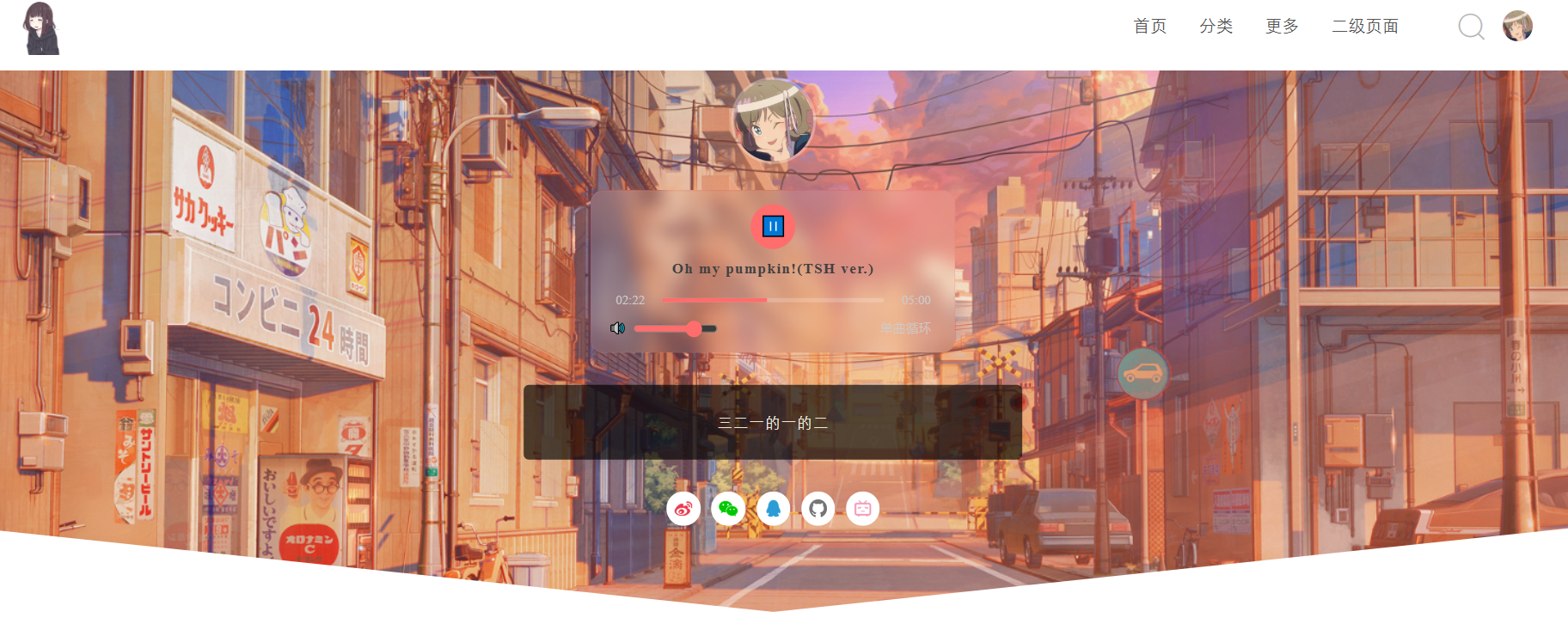
给博客新增了个音乐播放器
播放器功能说明
- 适配Akina主题配色和风格,磨砂半透明 + 红色主题色
- 核心:播放 / 暂停 一键切换
- 进度条:支持点击跳转播放位置 + 实时显示播放进度
- 时间:自动格式化「当前时间 / 总时长」,比如
01:25 / 03:40 - 音量:滑块调节音量大小,默认 80% 音量
- 循环:单曲循环开关,开启后按钮变红高亮提示
- 响应式:电脑端 + 手机端自动适配,手机上不会变形拥挤
- 过渡动画:按钮 hover 放大 + 半透明,进度条平滑过渡,体验丝滑
- 无兼容性问题:原生 HTML5+JS 实现,所有浏览器都支持
代码全览
<!-- 美观音乐播放器 - 适配Akina主题 -->
<div style="margin: 18px auto; width: 90%; max-width: 380px;">
    <div class="akina-music-player" style="background: rgba(255,255,255,0.08); backdrop-filter: blur(8px); border-radius: 12px; padding: 12px 16px; border: 1px solid rgba(255, 109, 109, 0.2);">
        <!-- 音频核心标签 -->
        <audio id="music-player" src="/music/OMP.mp3" preload="metadata"></audio>

        <!-- 播放控制按钮+歌名 -->
        <div style="text-align: center; margin-bottom: 10px;">
            <button id="play-btn" style="background: #ff6d6d; color: #fff; border: none; border-radius: 50%; width: 42px; height: 42px; font-size: 18px; cursor: pointer; transition: all 0.3s ease; outline: none;">
                ▶️
            </button>
            <!-- 新增歌名 -->
            <div style="margin-top: 8px; color: #ff6d6d; font-size: 14px; font-weight: 600; letter-spacing: 1px;">
                Oh my pumpkin!(TSH ver.)
            </div>
        </div>

        <!-- 进度条+时间 -->
        <div style="display: flex; align-items: center; gap: 10px; margin-bottom: 8px;">
            <span id="current-time" style="color: #ccc; font-size: 12px; width: 40px; text-align: center;">00:00</span>
            <div style="flex: 1; height: 4px; background: rgba(255,255,255,0.2); border-radius: 2px; overflow: hidden; cursor: pointer;">
                <div id="progress-bar" style="height: 100%; background: #ff6d6d; width: 0%; transition: width 0.2s linear;"></div>
            </div>
            <span id="total-time" style="color: #ccc; font-size: 12px; width: 40px; text-align: center;">00:00</span>
        </div>

        <!-- 音量+循环控制 -->
        <div style="display: flex; justify-content: space-between; align-items: center; margin-top: 6px;">
            <div style="display: flex; align-items: center; gap: 6px; color: #ccc; font-size: 12px;">
                <span>🔊</span>
                <input type="range" id="volume-control" min="0" max="1" step="0.05" value="0.8" style="width: 80px; height: 4px; accent-color: #ff6d6d; cursor: pointer;">
            </div>
            <button id="loop-btn" style="background: transparent; color: #ccc; border: none; font-size: 12px; cursor: pointer; transition: all 0.3s ease;">
                单曲循环
            </button>
        </div>
    </div>

    <style>
        /* 播放器hover美化效果,和Akina主题统一风格 */
        .akina-music-player button:hover{opacity: 0.8; transform: scale(1.05);}
        .akina-music-player #loop-btn.active{color: #ff6d6d; font-weight: bold;}
        .akina-music-player input[type=range]{outline: none;}
        @media screen and (max-width: 768px) {
            .akina-music-player{padding: 10px 12px;}
            .akina-music-player #play-btn{width: 38px; height: 38px;}
        }
    </style>

    <script>
        // 播放器核心功能JS
        const audio = document.getElementById('music-player');
        const playBtn = document.getElementById('play-btn');
        const progressBar = document.getElementById('progress-bar');
        const currentTime = document.getElementById('current-time');
        const totalTime = document.getElementById('total-time');
        const volumeControl = document.getElementById('volume-control');
        const loopBtn = document.getElementById('loop-btn');

        // 格式化时间 分:秒 例如 02:36
        function formatTime(seconds) {
            let min = Math.floor(seconds / 60);
            let sec = Math.floor(seconds % 60);
            return `${min.toString().padStart(2, '0')}:${sec.toString().padStart(2, '0')}`;
        }

        // 音频加载完成获取总时长
        audio.addEventListener('loadedmetadata', () => {
            totalTime.textContent = formatTime(audio.duration);
        });

        // 播放/暂停切换
        playBtn.addEventListener('click', () => {
            if (audio.paused) {
                audio.play();
                playBtn.innerHTML = '⏸️';
            } else {
                audio.pause();
                playBtn.innerHTML = '▶️';
            }
        });

        // 进度条实时更新
        audio.addEventListener('timeupdate', () => {
            const progress = (audio.currentTime / audio.duration) * 100;
            progressBar.style.width = `${progress}%`;
            currentTime.textContent = formatTime(audio.currentTime);
        });

        // 点击进度条跳转播放位置
        progressBar.parentElement.addEventListener('click', (e) => {
            const rect = progressBar.parentElement.getBoundingClientRect();
            const clickX = e.clientX - rect.left;
            const progress = (clickX / rect.width) * 100;
            progressBar.style.width = `${progress}%`;
            audio.currentTime = (progress / 100) * audio.duration;
        });

        // 音量调节
        volumeControl.addEventListener('input', () => {
            audio.volume = volumeControl.value;
        });

        // 单曲循环切换
        loopBtn.addEventListener('click', () => {
            audio.loop = !audio.loop;
            loopBtn.classList.toggle('active');
        });

        // 播放结束自动切换按钮状态
        audio.addEventListener('ended', () => {
            playBtn.innerHTML = '▶️';
        });
    </script>
</div>
<!-- 音乐播放器结束 -->
插入代码片段
<!-- 博主信息 -->
<div class="focusinfo">
<!-- 头像 -->
<div class="header-tou" >
<a href="<?php $this->options ->siteUrl(); ?>"><img src="<?php echo theprofile ?>"></a>
</div>
    <!-- 美观音乐播放器 - 适配Akina主题 -->
    <div style="margin: 18px auto; width: 90%; max-width: 380px;">
    【上面的完整播放器代码全部粘贴在这里】
    </div>
    <!-- ↑↑↑ 播放器代码结束 ↑↑↑ -->
    <!-- 简介 -->
<div class="header-info">
<p><?php $this->options->headerinfo() ?></p>
</div>
Comments | NOTHING
该文章已经关闭评论