
是挺好看的,倒是打印剪出来后不知道怎么拼了
Latex构建十二面立方体日历
- 其实模版可以在overleaf平台上找得到,搜索Calendar。
- https://www.overleaf.com/latex/templates/overleaf-themed-dodecahedron-calendar/zhzvgdbvpypg
- 我做了一些修改,将overleaf的水印去除掉了。
主程序main.tex
\documentclass[a4paper]{extarticle}

\usepackage[rgb,dvipsnames,svgnames]{xcolor}

%% Fonts etc
\usepackage[T1]{fontenc}
\usepackage{carlito}
\usepackage{caladea}
\usepackage{zi4}
\usepackage{url}

%% page layouts
\usepackage[margin=1cm,bottom=2cm,footskip=1.2\baselineskip]{geometry}
\usepackage{fancyhdr}
\fancyhf{}
\renewcommand{\headrule}{}

\pagestyle{fancy}

\usepackage{verbatim}

\usepackage{tikz}
\usetikzlibrary{calendar,folding}

\usepackage{OL-calendar-mods}

\definecolor{OLGreen}{HTML}{4F9C45}
\renewcommand{\SundayColor}{OLGreen}
\renewcommand{\monthcolor}{OLGreen}

\year=2026

\toggletrue{dayheadings}

\begin{document}
    \null\vfill\centering%
    \sffamily\small\noindent
    \begin{tikzpicture}[transform shape]
    \pic [folding line length=9.95em,
        face 1={ \calendar [dates=\the\year-01-01 to \the\year-01-last];},
        face 2={ \calendar [dates=\the\year-02-01 to \the\year-02-last];},
        face 3={ \calendar [dates=\the\year-03-01 to \the\year-03-last];},
        face 4={ \calendar [dates=\the\year-04-01 to \the\year-04-last];},
        face 5={ \calendar [dates=\the\year-05-01 to \the\year-05-last];},
        face 6={ \calendar [dates=\the\year-06-01 to \the\year-06-last];},
        face 7={ \calendar [dates=\the\year-07-01 to \the\year-07-last];},
        face 8={ \calendar [dates=\the\year-08-01 to \the\year-08-last];},
        face 9={ \calendar [dates=\the\year-09-01 to \the\year-09-last];},
        face 10={\calendar [dates=\the\year-10-01 to \the\year-10-last];},
        face 11={\calendar [dates=\the\year-11-01 to \the\year-11-last];},
        face 12={\calendar [dates=\the\year-12-01 to \the\year-12-last];}
    ]{dodecahedron' folding};
    \end{tikzpicture}
    \vfill
\end{document}
样式文件OL-calendar-mods.sty
\RequirePackage{graphicx}
\RequirePackage{relsize}
\RequirePackage{xcolor}

\newcommand{\SundayColor}{red}
\newcommand{\monthcolor}{blue}
\newcommand{\watermarkfile}{example-grid-100x100pt}

\newcommand{\addwatermark}{%
  \node[inner sep=0pt,opacity=0.2,yshift=-1em]{\includegraphics[width=7em]{\watermarkfile}};%
}

\RequirePackage{etoolbox}
\newtoggle{sundayweek}
\newtoggle{dayheadings}

\def\dhlist{0/M,1/T,2/W,3/T,4/F,5/S,6/S}
\AtBeginDocument{
\iftoggle{sundayweek}
  {\renewcommand\dhlist{0/S,1/M,2/T,3/W,4/T,5/F,6/S}}{}
}

% http://www.texample.net/tikz/examples/changing-the-default-calendar-layout/
\tikzstyle{week list sunday}=[
  % Note that we cannot extend from week list,
  % the execute before day scope is cumulative
  execute before day scope={%
    \ifdate{day of month=1}{\ifdate{equals=\pgfcalendarbeginiso}{}{
      % On first of month, except when first date in calendar.
      \pgfmathsetlength{\pgf@y}{\tikz@lib@cal@month@yshift}%
      \pgftransformyshift{-\pgf@y}
    }}{}%
  },
  execute at begin day scope={%
    % Because for TikZ Monday is 0 and Sunday is 6,
    % we can't directly use \pgfcalendercurrentweekday,
    % but instead we define \c@pgf@counta (basically) as:
    % (\pgfcalendercurrentweekday + 1) % 7
    \pgfmathsetlength\pgf@x{\tikz@lib@cal@xshift}%
    \ifnum\pgfcalendarcurrentweekday=6
      \c@pgf@counta=0
    \else
      \c@pgf@counta=\pgfcalendarcurrentweekday
      \advance\c@pgf@counta by 1
    \fi
    \pgf@x=\c@pgf@counta\pgf@x
    % Shift to the right position for the day.
    \pgftransformxshift{\pgf@x}
  },
  execute after day scope={
    % Week is done, shift to the next line.
    \ifdate{Saturday}{
      \pgfmathsetlength{\pgf@y}{\tikz@lib@cal@yshift}%
      \pgftransformyshift{-\pgf@y}
    }{}%
  },
  % This should be defined, glancing from the source code.
  tikz@lib@cal@width=7
]
% http://tex.stackexchange.com/a/10199/226
\tikzoption{day headings}{\tikzstyle{day heading}=[#1]}
\tikzstyle{day heading}=[]
\tikzstyle{day letter headings}=[
  yshift=0.5em,
  month code={\node[every month,yshift=1.5em]
{\tikzmonthtext};},
  execute before day scope={\ifdate{day of month=1}{%
    \pgfmathsetlength{\pgf@ya}{\tikz@lib@cal@yshift}%
    \pgfmathsetlength\pgf@xa{\tikz@lib@cal@xshift}%
    \pgftransformyshift{-\pgf@ya}
    \foreach \d/\l in \dhlist {
      \pgf@xa=\d\pgf@xa%
      \pgftransformxshift{\pgf@xa}%
      \pgftransformyshift{0.85\pgf@ya}%
      \node[every day,day heading,font=\relsize{-1}\bfseries,text=\monthcolor!80!black]{\l};%
    }
    }{}%
  }%
]

% \newcount\colorcounter
% \colorcounter=1
% \newcommand{\stepmncolor}{%
%   \ifcase\colorcounter\relax
%   \or \global\renewcommand{\monthcolor}{RoyalBlue}%
%   \or \global\renewcommand{\monthcolor}{OLGreen}%
%   \or \global\renewcommand{\monthcolor}{Tomato}%
%   \or \global\renewcommand{\monthcolor}{DarkOrchid}%
%   \else \global\renewcommand{\monthcolor}{BrickRed}\colorcounter=0%
%   \fi
%   \global\advance\colorcounter by 1
% }

\tikzset{%
  every calendar/.style={
      at={(-7ex,4.5ex)},
      day xshift=3ex,
      day yshift=2.75ex,
      \iftoggle{dayheadings}
        {day letter headings}
        {},
      \iftoggle{sundayweek}
        {week list sunday} % Sunday is first day of week
        {week list},  % Sunday is last day of week
      month label above centered,
      month text={\bfseries\textcolor{\monthcolor}{\%mt} \%y0},
      if={(Sunday) [\SundayColor]}
  },
}
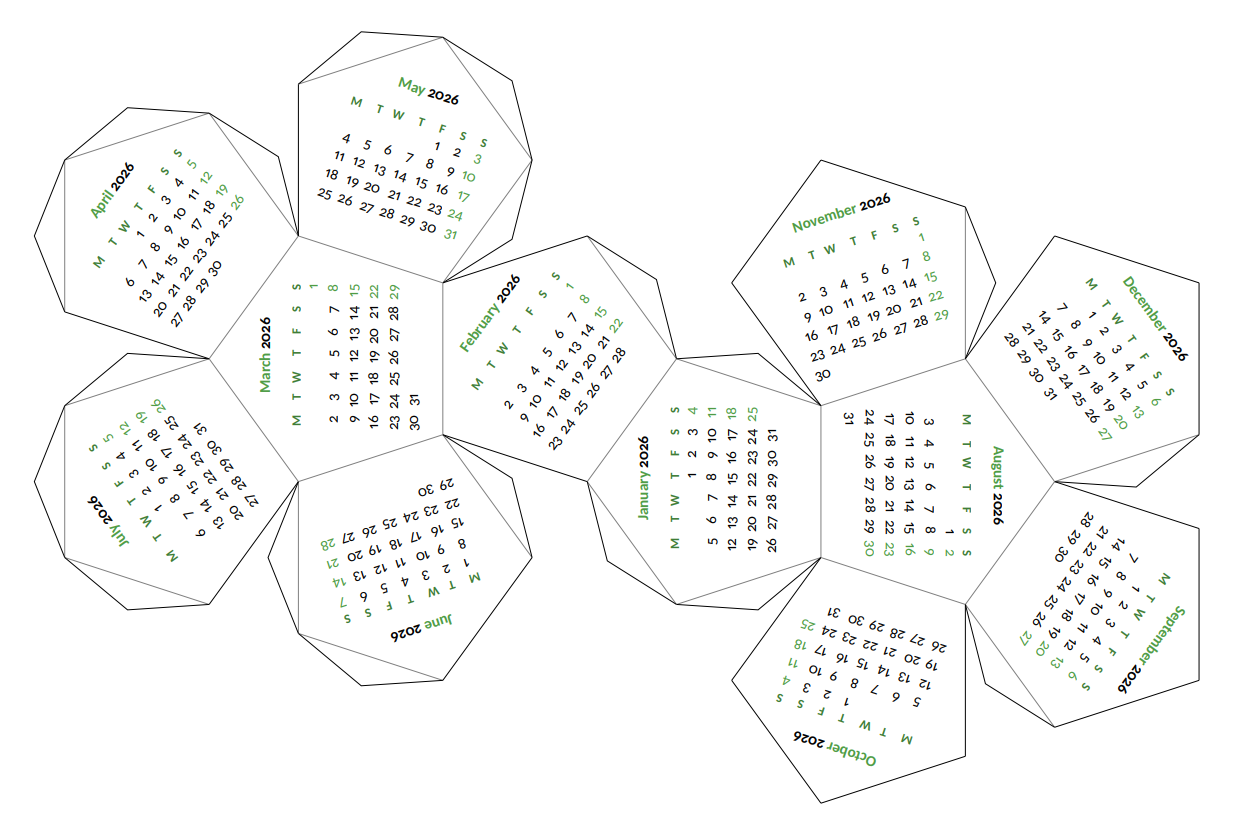
输出效果
- 挺好看的,倒是打印剪出来后不知道怎么拼了。

Comments | NOTHING
该文章已经关闭评论